Dealing with change in LIS – a personal perspective for #uklibchat

This blog post also appears on the uklibchat site for the chat of 6 August 2013, ‘The changing world of libraries and information‘. This post contains an additional reference to a blog post by the Library Loon on ‘steady-state librarianship‘ which was omitted from the version published by uklibchat – my error.

I have to change to stay the same
– Willem de Kooning

In this guest blog post for uklibchat I’ll talk about how I deal with change in my role at Senate House Libraries, University of London.

For my library masters I studied various models for describing change and how to manage change. I won’t dwell on these in detail but to give one example to think about, Lewin’s (1947) model describes change as a three step process:

  1. Unfreezing: preparing the organization for change, building a case, dismantling the existing “mindset”.
  2. Change: an uncomfortable period of uncertainty with the organization beginning to make and embrace changes.
  3. Freezing: finalizing the organization in a new, stable state and returning to former levels of comfort.

I use this model as a way of understanding a traditional view, sometimes presented as a “common sense” view, of change processes though I find the underlying assumptions in the model itself quite manipulative – for example the idea that to create change, the transient pain of change must be understood to be less for the organization than the pain of keeping things the same. Other models have more steps and so greater complexity. Kotter’s (1996) eight step change model is one example; at that level of complexity it reads more like “Kotter’s tips for implementing change” rather than a theoretical model.

The main things I take from these models and work experience are that:

  • The major challenges in implementing change come down to people rather than technology or machines.
  • The period of implementing change will be disruptive and uncomfortable, as a manager you cannot ignore but must engage with this.
  • Communication at all stages is key to a successful change process – including celebrating success afterwards.

At Senate House Libraries we’ve experienced a considerable period of disruptive change since the mid-2000s. One conclusion I’ve made from this is we are definitely no longer in the business of steady-state librarianship (Library Loon, 2012). Our “business as usual” now includes an implicit assumption that we need to constantly review and adjust our processes and services to meet changing needs and demands, hence my inclusion of Willem de Kooning’s wonderfully mysterious quote above.

This does not mean slavishly following every new trend in technology or being led by the nose by technology, particularly technology as repackaged and sold by library software and hardware suppliers, but actively maintaining current awareness and honestly evaluating the status quo as thoroughly as we do new ideas.

I say this because in some libraries I notice a willingness to subject the new thing in a change process to exacting and rigorous examination but not examine the status quo in the same way. There is an assumption here about the ‘rightness’ of our current approaches, whatever they happen to be. What I find troubling about this is the idea our way of working will remain ‘right’ for any length of time in a changing landscape. It is absolutely right not to try to fix something that isn’t broken or enact change for the sake of change, but this is something only knowable following evaluation.

For me the operational aspect of library service must inform strategic thinking and planning, as it’s those staff that are in constant contact with library members and understand the fine detail of the service. For this reason I involve my whole team in developing operational plans and contributing to strategy by identifying priorities for future work. My view is change shouldn’t just be something that ‘just happens’ to staff but something for all to take an active role in.

Personally I am influenced by approaches from IT as I have a systems background, and more broadly am influenced by application of researched-based and evidence-based practise in librarianship. To be clear I include qualitative research in this as an essential parter to quantitative research, adding much-needed richness and depth to our understanding of user experience and behaviour.

One change process at my workplace where I’ve used this approach is implementing a new discovery layer, or library catalogue, as part of our implementation of a new library management system, Kuali Open Library Environment (OLE). OLE does not have a traditional catalogue so a catalogue or discovery layer such as VuFind or Blacklight is needed.

To do this, we have built and developed the case for changing by:

  • Presenting about the project formally at all-staff meetings and individual team meetings.
  • Informal conversation with staff to answer questions and build awareness ‘things are happening’ around discovery.
  • Involving staff in thinking creatively about discovery in a workshop environment (I blogged about this aspect a few months ago).
  • Giving discovery the respect it deserves by treating it as a Web project that puts user experience at the core – and being seen to do so. This includes hosting a student from UCL Department of Information Studies doing ethnographic research on catalogue user behaviour.
  • Answer technical questions quickly and with confidence, including in-depth questions about SolrMARC (really) and metadata issues.

The important point for me as the head of our systems team is so much of this is not about technology, it’s about surfacing opinion and including staff in conversation. For example we’ve set up a beta test VuFind 2.0 instance to provide food for thought, but it’s not core

By necessity this blog post is brief, but I hope this specific example and the more general things I’ve said above help seed discussion for uklibchat.

References

Lewin, K. (1947) ‘Frontiers in group dynamics: concept, method and reality in social science; social equilibria and social change’, Human Relations, 1 (1), pp. 5-41, PsycINFO [Online] doi:10.1177/001872674700100103 (Accessed: 27 July 2013)

Kotter, J.P. (1996) Leading change. Watertown, MA: Harvard Business School Press.

Library Loon (2012) ‘Steady-state vs. expanding-universe librarianship’, Gavia Libraria, 22 July. Available at: http://gavialib.com/2012/07/steady-state-vs-expanding-universe-librarianship/ (Accessed: 7 August 2013).

Discovery at Senate House Libraries: staff focus groups

Introduction

At Senate House Libraries, University of London we’re part way though our project to migrate our library management system (LMS) to Kuali OLE, a Free Software / Open Source library services platform. As a deliberate design choice OLE does not come with an online catalogue for end users, so we are approaching discovery as a work package in our LMS project. To this end I recently ran focus groups for staff to start to specify what goes into a functional specification for our discovery system.

Part way into writing my summary of the high-level requirements I realised I was writing something like a manifesto. I stopped and split this into a separate page in our Confluence wiki, and this is what I wanted to share with you. If you want to see something more like a specification for a library discovery / vertical search system, take a look at Ken Chad’s libtechrfp site on Vertical Search as a starting point.

Running focus groups

From my point of view it’s liberating to start with a clean slate for discovery and not with the limitations of existing library vendor solutions. There are a whole host of implications here, primary for me are not being tied to vendor development roadmaps and technology choices, and not having limitations from the LMS carry through to the discovery layer. So, I wanted to start with an open mind and not presume too much about staff received opinion or staff use of our existing discovery systems.

I asked participants to think about some questions as a prelude to a mix of small- and big-group discussion in a workshop context.

  • What’s valued in our current discovery systems, and what are outstanding problems?
  • What’s missing that should be included in the next discovery system?
  • What’s most important to researchers?
  • What would a good discovery system look like, and how would it behave?

I have to apologize for management-speak of asking what does good look like, but it’s a serious point. It is incredibly hard to describe what a successful new system would be like to use, but these are the things we need to be thinking about rather than say, a list of missing features in Innovative’s Encore Discovery versus their older WebPAC Pro catalogue.

Just to add that yes, testing with library members is to follow. This will include the usual usability testing that accompanies and informs any sensible, well-designed web project and also a more in-depth investigation into user behaviour using ethnographic methods.

“[We want] the moon on a stick”

These group discussions were incredibly productive and featured a good deal of imaginative and daring thinking about what a library catalogue should be and how it should behave. My favourite headline from these small group discussions was a page titled, “the moon on a stick”. I think this is a good starting point: we should think big and aspirational, not small and limited.

Our goal should be full discovery of everything including searching across books, journals, archives, images, and so on in a way that is clear about what you’re searching and provides options to include and exclude different content. In this context the local bibliographic database becomes the biggest of several databases that discovery draws from alongside the archives catalogue, eprints repository, and digital asset management system.

Unfolding complexity

So, how do we provide breadth and depth of discovery without overwhelming the reader with a firehose-like experience of masses of information; and impossible complexity that requires a LIS masters degree to understand?

The key point for us is discovery needs the ability to be as simple or complex as you want to at any given time. We need a way of providing a range of levels of complexity in the same system rather than hiding all the complexity behind an ‘advanced search’ link.

This doesn’t just mean copying from web search, as a single search box is very difficult to get right in the library context. Even if many libraries are going this way nowadays it is very hard to do it well and impossible to please everyone. On the one hand, old school OPACs rely too much on specialist knowledge of how the catalogue works and the structure of the underlying metadata that powers them. On the other, library attempts at single search boxes use keyword indexes that fail to make best use of the complexity and richness of that underlying metadata.

Instead we need an approach that respects the intellectual ability of our readership and the status of our institution, and respects the reader’s conceptual understanding of the library. Our approach should reflect the pride we have in being a library and our professional abilities as librarians, without attempting to turn readers into mini-librarians.

Discovery must include ways of bringing in complexity from a simple starting point, something web search engines can do quite well.

Readers shouldn’t feel they’re starting from a position where they’re telling the library, “I’m stupid”, or “I’m intelligent”. Discovery needs to reconcile providing a simple starting point with surfacing information that may be relevant, but is deep and complex. We know that buried somewhere in the clutter are results that are useful to the reader. The underlying technology may be very complicated but the experience of the system should be the opposite.

We need to meet the needs of different groups of users, or the differing needs of the same user. We know there are primary and secondary uses of our collections for the same person, and a reader may have a different approach in a different context depending on what they are using us for. Staff are users of the catalogue and discovery tools should be easier for staff, too.

User experience

To inform this ‘unfolding complexity’, discovery must bring in user experience concepts and best practise from elsewhere in and outside libraries. The starting point in our thinking here is discovery should be navigable like a modern web site is, and to achieve this it will be designed in a similar way to how our our website was designed. That is, similar approaches and techniques given a library spin that respects our role and the reasons readers choose to sign up for membership.

User experience is key to our web presence but it must be a theme throughout the services we offer: it can’t stop at the library website. There is a gulf between library websites and library catalogues and discovery that we need to bridge. Libraries spend time and money building good websites, but you’ll still find terrible usability when you move over to their catalogues. John Blyberg sums this up as:

The problem lies with inflexible and outdated systems rather than no-one bothering with usability testing or not caring about their readers. Our next discovery system can’t be another weird product from Libraryland that is disconnected from the approach we take when building our websites.

Objecting to my own methodology

I’d like to end on a little reflection about methodology and our subjective views of catalogues based on our experience and familiarity.

Many staff expressed a wish for a “simple”, “uncluttered”, “user friendly”, or “intuitive” interface as contrasted with a “busy”, “cluttered”, or “clunky” interface. I understand these wishes, and I think there is a certain know it when I see it gut feeling about overall user experience that makes something “simple” or “clunky”, but intellectually I know it’s difficult to unpack what these terms mean as they’re so subjective. You might guess a concern here is a term like “user friendly” being used as a proxy for personal preferences or familiarity, and there is a contrast between familiarity of staff traditional information retrieval interfaces versus familiarity of readers with modern websites that I think is important too.

So we do need to dig in! At this point the workshop format breaks down because it’s difficult to employ methods such as close questioning or laddering in a group work situation, you really need a one-to-one interview. However, I tried to unpick this as much as possible in the focus groups without anyone feeling too interrogated. For example, if the Encore feel is “cluttered” what is it that would improve it? What is it about the classic WebPAC Pro or another catalogue that is uncluttered?

I can see a danger here in acting as an interpretive layer or a translator between what someone says and what I think they really mean, and then how I think that should be implemented in a new discovery layer. In hindsight I wish I could’ve sat everyone down one-to-one and ran through some repertory grids to allow for comparisons between different catalogue interfaces based on those constructs such as “clutteredness”.

I had done this in my masters dissertation on library catalogue user experience and found it works really well, once you get over it being an “out-there method” (I smiled in agreement when I read that in Lauren Smith’s recent blog post on fieldwork).

This is something I may try as part of testing options for discovery interfaces such as VuFind and Blacklight.

Acknowledgements

Thanks to Andrea Meyer-Ludowisy (Research Librarian, Western European Languages) and Joe Honywill (Associate Director, Digital Futures) at Senate House Libraries for helpful discussion on the subject.

How we added WebBridge / Pathfinder Pro links to our Encore catalogue

When we launched our new catalogue, Encore from Innovative Interfaces Inc., in June 2011 among the first problems identified by staff and library members was that it did not have a way to request journals from our closed stores (we call this the Stack Service which includes our tower and an offsite store in Egham, Surrey).

This missing functionality between the old and new catalogue was a major barrier to buy-in. Not having it meant staff had to explain three parallel systems for requesting just one type of material from the store. Our readers want to request store material online quickly and efficiently, not have to deal with navigating between two different catalogues.

A new release of the Encore catalogue software has enabled us to rectify this and in this post I’ll explain how. The third request system was paper forms, in case you’re wondering…

Link from the Encore record to request a store journal, based on Pathfinder Pro data.

Requesting journals

Historical note: Pathfinder Pro used to be part of Innovative’s WebBridge product, which included both an OpenURL link resolver for linking in, and software for presenting context-sensitive links on your record display. Systems librarians at Innovative sites often refer to both products as “WebBridge”.

Requesting journals from a closed store is problematic for an Innovative library if you are cataloguing journals in a normal way – using a holdings or checkin record to detail what you have, rather than itemising each individual journal volume on its own item record.

In our old WebPAC catalogue I had devised a way of using Pathfinder Pro to link out to a Web form that would send some bibliographic data to pre-populate a form. It’s easy to link out to a form from the record (put a link in the MARC 856 for a quick solution) but reusing the record metadata itself helps readers to not introduce errors.

In my opinion Pathfinder Pro is a good product – the tests you can apply are quite powerful including matching parts of your record based on regular expressions and the like.

The basic principle to enable this linking is:

  1. Check to see if the holdings record is in a store location. Egoist : an individualist review is coded ‘upr’, for example, and a data test in Pathfinder Pro is used see if the holdings record location field equals ‘upr’.
  2. If the record is a store location, build a link based on selecting the journal title, classmark, and the system record number from the bibliographic record. What is actually rendered on the page is a link using the same icon as we use for other types of online requesting:
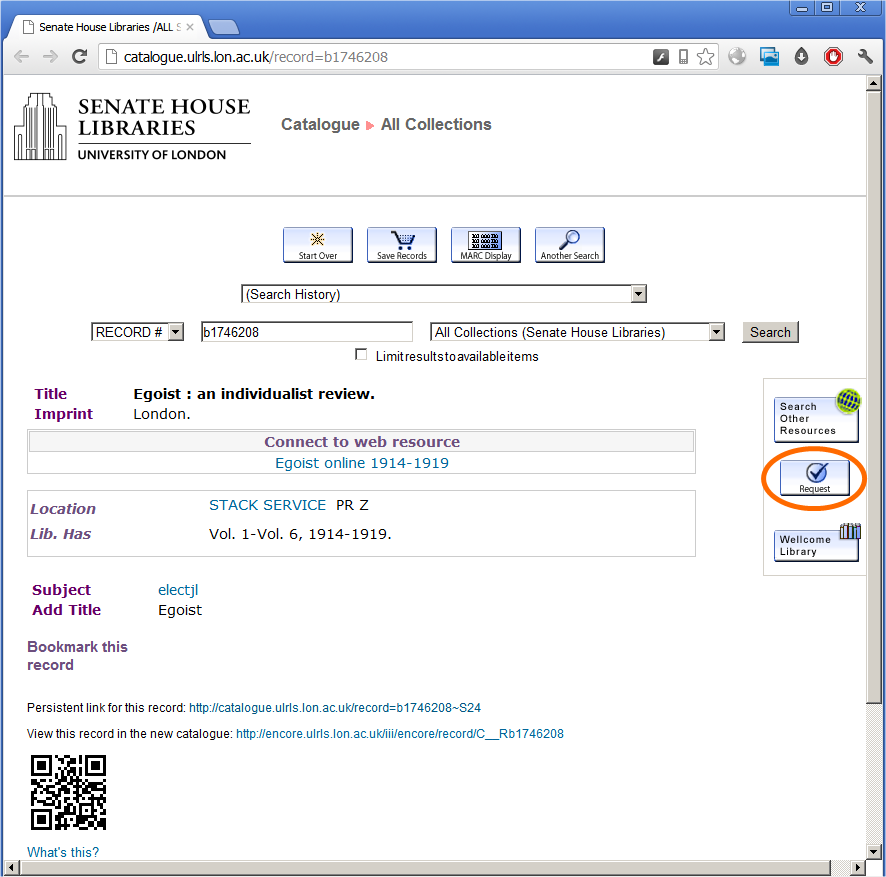
Link from the WebPAC record to request a store journal, using Pathfinder Pro (circles in orange).

This generates a link to our online request form:

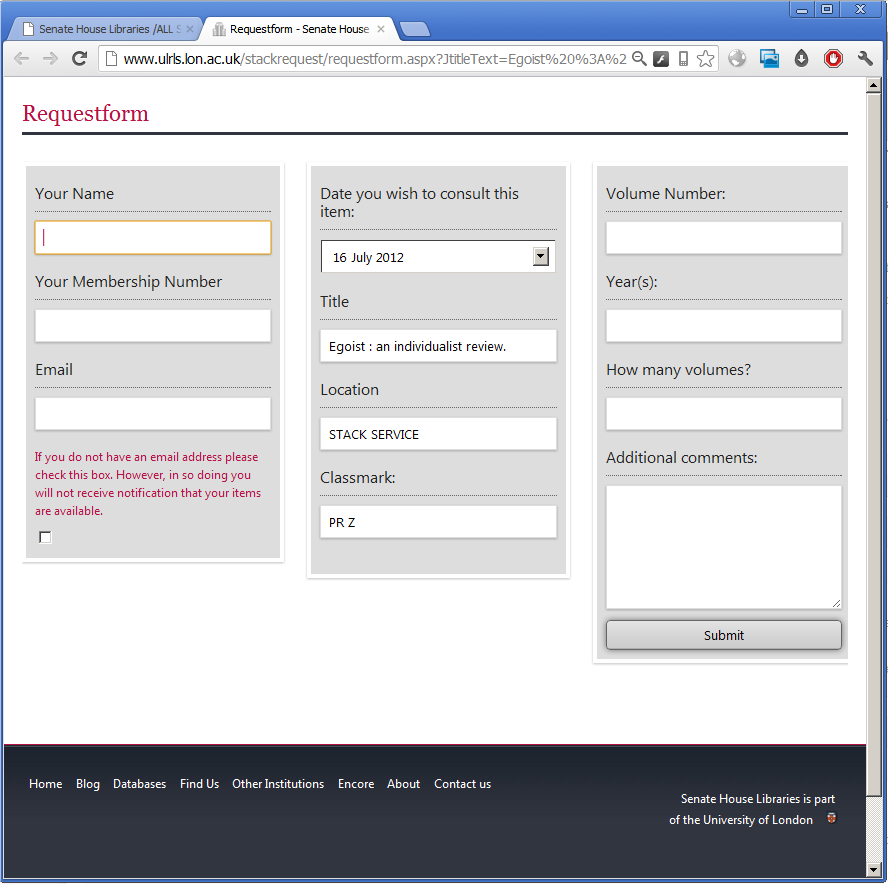
http://www.ulrls.lon.ac.uk/stackrequest/requestform.aspx?JtitleText=Egoist%20%3A%20an%20individualist%20review.&JlocationText=STACK%20SERVICE&JclassmarkText=PR%20Z&JbibText=b1746208a

Which leads to a neatly pre-populated form:

The problem with Encore

The thing that prevents this working in the new catalogue is Encore lacks the Pathfinder Pro “Bib Table” which allows you to place links on the record display itself. In the screenshot above the Bib Table is the space on the record that contains three buttons, including the store request button circled in orange.

This is a problem as many Innovative sites have built services around this feature of Pathfinder Pro that include placing a link prominently on the bibliographic record.

Towards a solution for Encore

The latest Encore release 4.2 allows you to customise the Encore record display by including your own JavaScript. My presentation on this from the European Innovative Users Group conference 2012 with further examples is available:

I decided there simply had to be a way to insert a link to the store request form into the page using JavaScript…

  • Our first thought was using JavaScript to check if the record is in the store, then building a link to the request from by plucking bits of metadata from the page. This was a non-starter as the structure of the rendered Encore page is not semantically sound enough to work with in this way.
  • Second thought was to use an Ajax call to scrape the record display of the classic WebPAC which would be easier to work with. This isn’t possible as Encore and the WebPAC run on different Web servers so you run into the same origin policy. And no, you can’t set up a proxy server on your Encore server to work around it.
  • Third thought was using a Web application with a dedicated screen-scraping library that that could pull the metadata from the classic WebPAC or Encore. We’d link to this from the Encore record display and allow it to direct the reader’s browser to the populated request form. This is almost what we implemented. Read on…

How to do it

Building a link out from the Encore catalogue is simple. The JavaScript for the Encore record is available as a Pastebin for easier reading.

What this will do:

  1. Get the system record number. The simplest way I’ve found to do this from the page itself is use the document.URL which contains the record number.
  2. Check to see if a div exists with ID toggleAnyComponent. Not that you’d know it from the name, but this div is rendered only if there is an attached holdings / checkin record which means we’re dealing with a journal record.
  3. If if exists, check to see if the div matches a regular expression for the string “STACK SERVICE”.
  4. If it does match, create a link out to our Web application and append it to the existing customTop div.

This link out appears in this form:

http://www.ulrls.lon.ac.uk/stackrequest/parse.aspx?record=1746208

1746208 is the system record number for Egoist, minus the leading ‘b’ and trailing check digit.

Web application for screen-scraping

The real work is carried out using a Web application written in ASP.NET by my team member Steven Baker. Steve used the Html Agility Pack which is a library for .NET ideal for scraping Web pages. Of course, you can use your favourite language to accomplish the same thing.

Scraping from the Encore or WebPAC record display is a complicated business and how our library has named our various locations and classmarks was not helping.

So instead of scraping the page directly and including lots of different tests to deal with the various oddities found in the markup, it’s much simpler to scrape the WebPAC record display and pick out the div containing the link rendered by Pathfinder Pro.

This link already has the metadata required for the store request form so it’s then just a matter of using this URL to send the Web browser on their way to the request form.

The first step is to load the classic WebPAC page using Html Agility Pack. The link from Encore provides the system record number to generate a link to the WebPAC screen in this form:

http://catalogue.ulrls.lon.ac.uk/record=b1746208

The Pathfinder Pro wblinkdisplay div from the classic WebPAC looks like this for the example of Egoist : an individualist review:

<div class="wblinkdisplay">
<form name="from_stack_service159_form">
<a href="" onClick="javascript:loadInNewWindow('/webbridge~S24*eng/showresource?resurl=http%3A%2F%2Fwww.ulrls.lon.ac.uk%2Fstackrequest%2Frequestform.aspx%3FJtitleText%3DEgoist%2B%253A%2Ban%2Bindividualist%2Breview.%26JlocationText%3DSTACK%2520SERVICE%26JclassmarkText%3DPR%2BZ%26JbibText%3Db1746208a&linkid=0&noframe=1');return false;"><img src="/webbridge/image/request.gif" border="0"></img></a>
</form>
</div>

You can see the URL Pathfinder Pro normally redirects the Web brower to. The next steps are:

  • Select the div with class wblinkdisplay.
  • Cut out the URL based on using “resurl=” and “‘)” at the start and end of the URL to get the indexes needed.
  • URL-decode the resulting string.
  • Redirect the Web browser to that URL.

In live use, this is so fast that the end user doesn’t realise anything is happening in between clicking the “Request from Store” button in Encore and getting to the request form itself.

Comments on this approach

There are several advantages to handling Pathfinder Pro and Encore integration this way:

  • The work to pick out metadata from the record has already been done in Pathfinder Pro and doesn’t need re-implementing.
  • This will be easy to extend to other store journals, or if journals move from open access shelves to the store. We only need set up a new location in Pathfinder Pro and it’s reflected in Encore as well. We’d have to do this anyway to enable online requests in the classic WebPAC.
  • This approach isn’t specific to journals and could be used to put any links generated by Pathfinder Pro into Encore.

However, this isn’t a complete solution as it doesn’t just give you the Pathfinder Pro Bib Table in Encore. This is what we would really like and what we have asked our software supplier for. That said, if you can pick something unique out of the Encore record to test for then you can link out from Encore in a way that replicates the behaviour of the linking in classic WebPAC with Pathfinder Pro.

Please do contact me with any questions or your thoughts, or leave a comment below.

The anti-social catalogue – at Library Camp Leeds

On Saturday 26th May I attended Library Camp Leeds (libcampLS), a regional library unconference hosted by Leeds City Libraries. The conference took place on a beautiful sunny day at Horsforth library.

In a masterful move by the organizers we decamped to nearby Hall Park for the afternoon sessions which meant the session I had pitched on library catalogues took place ‘en plein air’. The unconference style made this easy to accomodate though there were some downsides, notably a dog that turned up and dug into Dace‘s salty cheese sticks just as the session was getting started…

Dog joining in with ‘cake camp’, photographed by Dace Udre, license CC-BY-NC.

The anti-social catalogue

Session underway, photographed by Kev Campbell-Wright, license CC-BY-NC-SA.

What is the next-gen library catalogue?

I opened by outlining what we mean by a “discovery interface” or “next-generation library catalogue” to give us some grounding. Then I gave a quick outline of the failure of current library systems to be “social”, that is, how they don’t facilitate social interactions.

I paraphrased from Sharon Yang and Melissa Hoffman’s article (2011) surveying library catalogues. I’ll repeat this below as I know it’ll come in handy in future. What makes something a next-generation catalogue isn’t very well-defined but we can say such a system will have many of these features, whereas traditional catalogues have few:

  • They provide a single point of searching across multiple library resources including the local bibliographic database, journal articles, and other materials.
  • The Web interface is modern and its design reflects that that found in Web search and ecommerce sites rather than traditional bibliographic retrieval systems.
  • They favour keyword searching via a single search box.
  • They feature faceted navigation to rework or limit search results.
  • They are tolerant of user error and provide “Did you mean…?” suggestions.
  • They feature enriched content drawn from sources outside the library such as book jackets, reviews, and summaries.
  • They feature user-generated content such as reviews and tagging.
  • They feature recommendations or suggestions for related material, which may be based on information held in the library system (e.g. circulation data) or elsewhere.
  • They feature some kind of social networking integration to allow for easier sharing and reuse of library records and data on these Web sites.
  • To facilitate this sharing, records have stable persistent links or permalinks.

What are the problems?

Some of the features mentioned above are social in nature, including user-generated content such as tagging and reviews, recommenders built from using circulation data, and integration of social networking sites. So “next-generation” implies a suite of features that include some social features, but not everything next-generation is such a social feature. Furthermore the underlying library management system and metadata are not likely to be too supportive of these features.

In practise social features like tagging and reviews haven’t really taken off in libraries and those of us using these tend to find low use among our customers. This is certainly my experience with tagging, enabled on our Encore catalogue at Senate House Libraries. It is not enough to have a reasonably large bibliographic database and a reasonably large membership then turn on tagging and expect something – the magic – to happen.

I do not think library catalogues are perceived as a social destination by our readers. However I think what prevents this is not that there is no wish by readers to interact in this way using our systems, but that we’re only just starting to make a serious effort to build features that encourage genuine social interaction.

This is what I mean by current catalogues being anti-social. However, I did like this alternative definition from Gaz:

Discussion

Note: attributions below are based on my notes from the day. If I’ve made a mistake please let me know.

The conversation was lively and varied and I was really pleased to facilitate a session where so many present wanted to contribute.

There was a general feeling the current technology isn’t there yet and implementation of social features on our catalogues do not encourage social interaction.

Luke explained catalogues built by vendors reflect the small marketplace offered by libraries and that technology in libraries tends to be quite far behind leading edge. He described the development of VuFind for discovery based on frustration with software supplier offerings – but one that required a willingness to invest in staff resource to develop and implement VuFind. This was done at Swansea University, Swansea Metropolitan University, and Trinity Saint David as a project – SWWHEP.

Luke mentioned something I have heard as a common objection to user-generated content in catalogues, the fear that students will abuse it and tag books with swearwords and so on. There was a similar concern raised that books written by academic staff might be rated down by students (with a cheeky suggestion added – “They should write better books”). Luke pointed out this has not proved a problem on the Swansea iFind implementation of VuFind (as it hasn’t at Senate House Libraries) because the feature is simply not being used. I thought that in some ways the feature being ignored is worse than readers actively disliking it…

Sarah gave an example of a ‘paper-based Web 2.0’ (my term) implementation where library members were given a paper slip to rate or review an item – which would then be keyed into the catalogue by staff!

Several campers made the point bringing in user-generated content from outside – such as Librarything for Libraries – could make a big difference as then there’s clearly something there to start with.

It was generally agreed building features that create good social interaction requires effort, it’s not something we can easily bolt on to existing systems that aren’t designed for this from the ground up.

There was agreement with Iman‘s point that for social features to become popular there should be an incentive for the customer. The customer should get value from the interaction, or what’s the point of doing it? Alongside this it shouldn’t take huge effort or require a great deal of work to be social. The concept of gamification as a way of providing that incentive was raised here.

Several campers gave example of where libraries know great a deal of information about our readers habits and actions, and could re-use this to enhance their experience of the physical or online library. The approach to social features on the catalogue that requires least effort are those interactions that happen by you doing what you would normally do anyway. For example borrowing and returning books to generate recommendations based on circulation information.

One problem was raised about emphasising top loaning items from the collection in that this could become self-sustaining: an item remaining popular because it is on that list. (At this point I wondered that I probably couldn’t make our top-loaning author Michel Foucault any more popular if I tried…)

Liz made a thoughtful point that the use of technology is important, that is how it enables us to fulfil the mission of the organization (the library, the university). We should concentrate on what’s relevant for our organizations. So: we need to be clear what we’re trying to achieve with these features and what the point of it all is. Technology used poorly for its own sake had already been raised, an example given being linking to an ebook record from the catalogue using a QR code: if you’re already online looking at the catalogue, why not just a normal hyperlink?

Rather than limiting ourselves to what other libraries are doing we should be thinking along the lines of features employed in ecommerce systems. Spencer made the interesting point that ecommerce systems he has worked with can build a much more complete picture of user needs and wishes with a view to offering them a tailored online experience. This is years ahead of anything libraries currently do.

Some more fundamental problems were raised about technology and libraries.

Linsey raised the idea of ’embarrassing IT’, that is IT provision that’s so bad we as information professionals are ashamed to offer it. Alison said the technology needs to be there to support new catalogues, or our staff and customers simply can’t make the best use of them. An example given by the group was of an older catalogue remaining popular versus a next-generation system because it’s faster to use on outdated computers provided by the library.

These problems aren’t minor. Feedback from the group was that our Web presence and user experience of our Web sites really influences users’ perception of our organizations. There’s a real need for us to do this well, not half-heartedly.

Acknowledgment

My thanks to Natalie Pollecutt at the Wellcome Library for helpful discussion about the concept of the ‘social catalogue’ ahead of libcampLS.

References

Yang, S.Q. and Hofmann, M.A. (2011). ‘Next generation or current generation?: a study of the OPACs of 260 academic libraries in the USA and Canada’, Library Hi Tech, 29 (2), pp. 266-300. doi:10.1108/07378831111138170

The Mnemosyne-Atlas: adding Pinterest to the library catalogue.

Why pinterest?

Last week I attended a talk by Phil Bradley at the Cilip in London AGM (a podcast of this talk Around the World on a Library Degree is available). Phil pointed out Pinterest as a particularly useful and interesting site to watch. I had not heard of this before so registered an account. Shortly after I noticed the Pinterest implementation at Darien Library.

Pinterest is a social networking site for sharing photos. Users organise items of media on boards – typically thematically or for a particular event.

I was immediately struck by the appearance of a full pinboard, it made me think of Aby Warburg’s Mnemosyne-Atlas. The Mnemosyne-Atlas was Warburg’s unfinished work, a series of plates (or boards) showing images from the classical period to Warburg’s present time. Alongside classical and renaissance images it included photographs, maps, woodcuts, advertisements, fragments of text, posters, and so on – all kinds of visual media. Warburg intended the boards to be accompanied by commentaries, but these were incomplete on his death in 1929 and only fragments exist.

Taken as a whole it is a summary of all of Warburg’s various interests. It has been compared with avant-garde photo montages in form but is something more, perhaps even a “visual archive of European cultural history” (Rampley, 1999). A photograph from an exhibition of Mnemosyne-Atlas plates is shown above. This is from a set on Flickr called aby warburg – the mnemosyne atlas.

Without expecting every user to be a scholar and cultural theorist of Warburg’s stature, I think there is value in supporting linking our catalogue records to Pinterest as it will allow users to relate them to other images and construct different meanings from them.  I feel it’s especially appropriate for Senate House Libraries which includes the library of the The Warburg Institute.

What is different about Pinterest is it makes creation of ‘vision boards’ easy – many sites now support pinning an image to Pinterest, and there are smartphone apps allowing you to pin anything you can photograph.

How to do this in Encore

At Senate House Libraries we have testing a beta version of the next release of our next-generation catalogue (or discovery interface), Encore. Caution! Everything described below links to a beta version of our catalogue that is not yet finished.

Adding a “Pin It” button is made possible by the ability to insert your own Javascript on the bibliographic record display of the new version of the catalogue. To be able to pin a catalogue record to a Pinterest board at minimum we need an image and a link to associate with it; a description of the image is optional. In this case the image is of the book jacket.

Here’s the Javascript to accomplish this, mind any line wrapping and WordPress oddness if you copy and paste it.

<script src="//s7.addthis.com/js/250/addthis_widget.js" type="text/javascript"></script>
<script type="text/javascript">
(function() {
var azImageDiv = document.getElementById("imageAnyComponent_0");
if (azImageDiv) {
if (azImageDiv.width>1 && azImageDiv.height>1) {
// key is a variable Encore uses for checking Google Books. It contains 'ISBN:' plus an ISBN10.
var azAsin = key.substring(5);
var pinterestDiv=document.createElement('div');
pinterestDiv.innerHTML = '<span class="bibInfoHeader">Pinterest</span><div class="addthis_toolbox addthis_default_style" ><p>' + '<a class="addthis_button_pinterest" pi:pinit:url="https://encore.ulrls.lon.ac.uk/iii/encore42/record/C__R' + recordid + '" pi:pinit:media="' + 'http://images-eu.amazon.com/images/P/' + azAsin + '.01._SCLZZZZZZZ_.jpg"' + ' pi:pinit:layout="horizontal"</a></div>';
document.getElementById("customBottom").appendChild(pinterestDiv);
}
}
})();
</script>

Commentary

The challenge is to ensure we only render the Pin It button when we’re confident we have a book jacket image.

First step is to get the imageAnyComponent_0 div and check the size. This div contains the jacket image on Encore and is put there by the catalogue. Amazon returns a 1×1 pixel GIF if it has no jacket to offer, so if the image is larger than this it is probably a jacket image. Having the image is key: if we don’t have it we render nothing.

Assuming we have a jacket image I use the Add This to insert a Pinterest button which will pin a larger version of the jacket image and a link to the catalogue. Add This makes it very easy to deal with various social media buttons with minimal effort, plus it includes analytics information allowing us to judge use of these services on the catalogue. I recommend it.

Getting the ISBN turned out to be easy as the vendor’s Javascript for checking for Google Books previews already declares a variable key containing ‘ISBN:’ plus the ISBN-10 of the book.

Result

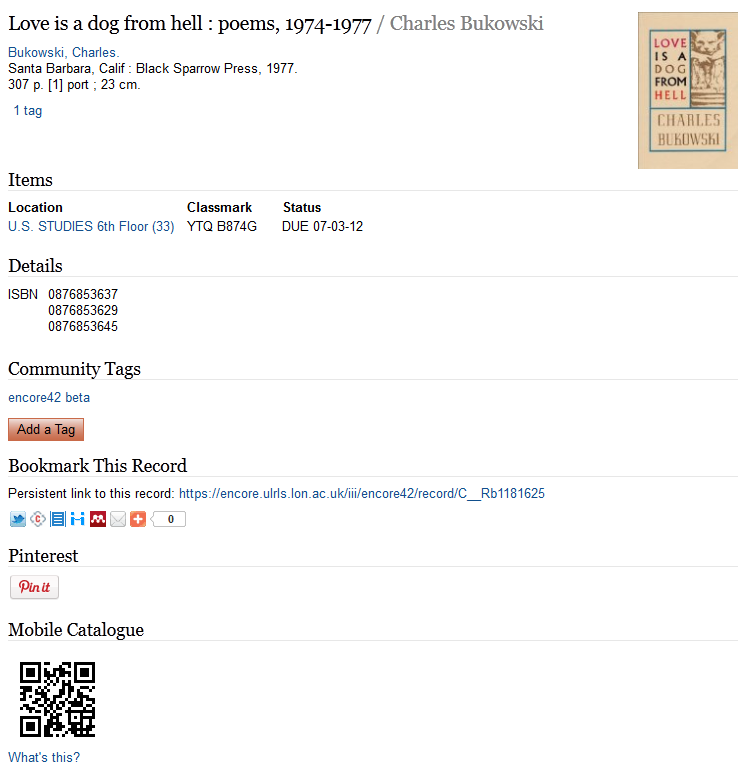
Here is how the the Pin It button appears in Encore:

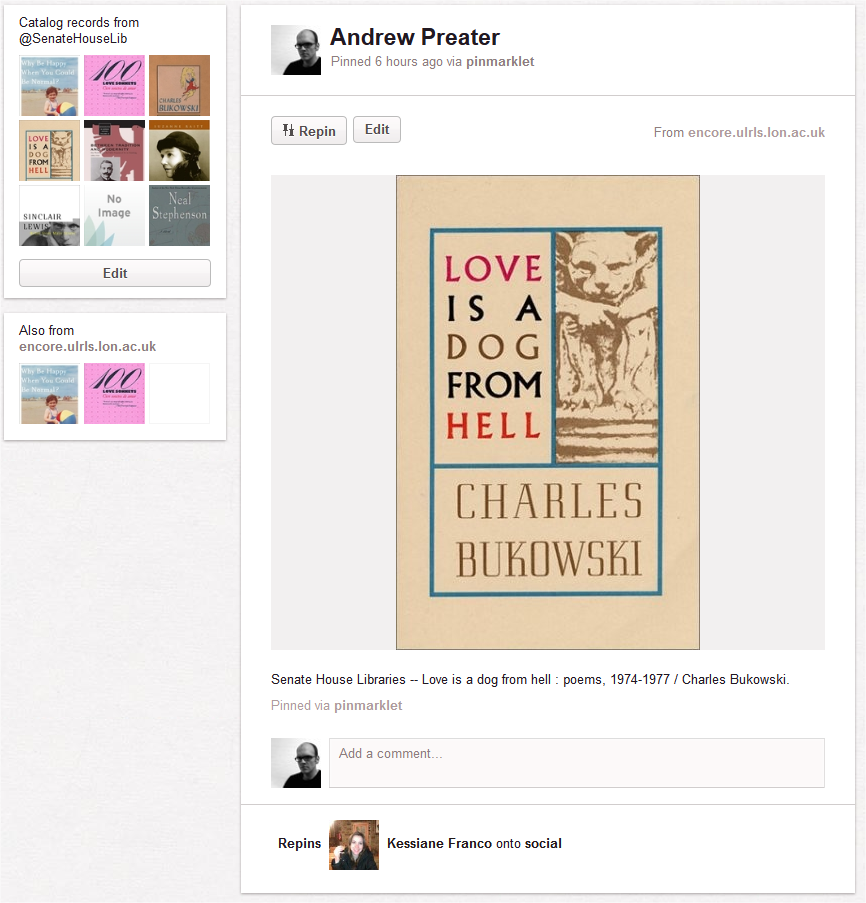
If you use the Pin It button, it results in the creation of a pin like this, which can be found on my (testing!) board Catalog records from@SenateHouseLib:

Problems

I think this is a satisfactory start: comments, improvements and criticism welcome (but especially improvements).

First problem is Add This doesn’t seem to support passing a description for the pinned item. To make sharing as “frictionless” as possible I wanted to the add part of the page title as a description, for example: Senate House Libraries — Love is a dog from hell : poems, 1974-1977 / Charles Bukowski would be fine, and the Pinterest user can edit this during pinning. I added this manually to my pin above. Based on the syntax for the other options above it should be: pi:pinit:description=”description” but that doesn’t work.

Second problem is Amazon images doesn’t support ISBN-13, only ISBN-10. However the Encore catalogue will use the first ISBN that appears in the catalogue record which might be an ISBN-13. Converting from ISBN-13 to ISBN-10 is not a complete solution as although you could pin the item, you won’t see the jacket image in the catalogue in the first place.

Photo credit

Mnemosyne-Atlas boards photographed by Flirck user dzsil, license CC BY-SA.

References

Rampley, M. (1999). ‘Archives of memory: Walter Benjamin’s Arcades project and Aby Warburg’s Mnemosyne Atlas’, in Coles, A. (ed.) The optic of Walter Benjamin. London: Black Dog, pp. 94-119.

Tracking usage of QR codes by smartphone users

Recently I added QR codes to the Senate House Library catalogue hoping to improve user experience for smartphone users. In true “dogfooding” style I have made a lot of use of it myself, but I need to see more data. One thing was missing was any analytics tracking for smartphone users recording these codes and following them into the mobile catalogue.

Tracking QR code use

I realised I could do this by adding parameters to the QR code URLs that would be picked up by Google Analytics: Analytics Help – How do I tag my links?

I tweaked the Javascript generating my markup to insert the required parameters utm_source, utm_medium, and utm_campaign:

  • Campaign Source (utm_source): webpac
  • Campaign Medium (utm_medium): qr
  • Campaign Name (utm_campaign): mobile

Values used can be whatever you want, I’ve tried to keep them short but meaningful. You can then track visitors under Traffic Sources – Sources – Campaigns in Google Analytics.

Adding complexity

Being able to track use of this service is very helpful, but providing more information in the QR code increases the complexity of the code and makes it more “dense” and “busy”. Though I’ve had no problems with this on my phone this could cause problems for older smartphones with lower-resolution cameras. My quick solution is just to bump up the size a bit as this makes the QR code easier for the smartphone to read.

For comparison including a longer URL takes you from this:

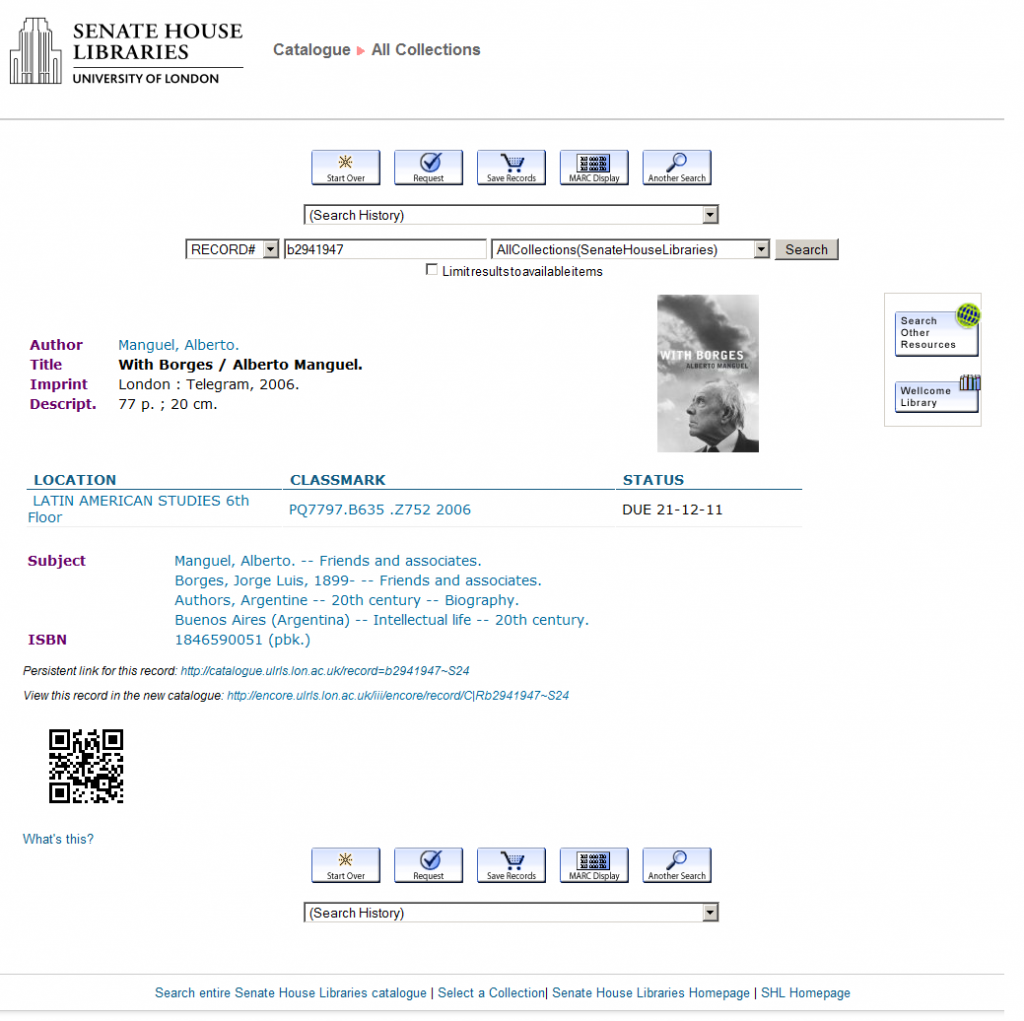
With Borges / Alberto Manguel.

http://m.ulrls.lon.ac.uk/record=b2941947~S24

To this:

With Borges / Alberto Manguel.

http://m.ulrls.lon.ac.uk/record=b2941947~S24?utm_source=webpac&utm_medium=qr&utm_campaign=mobile

As these QR codes are meant for a mobile phone camera to direct a Web browser to a page, I thought the URL itself need not be “cool”, bookmarkable, or even very human readable. One option is to shorten the URL as it is generated and encode that. Here is the result of shortening with our own shortening service. (Your library does have its own URL shortening service, right?)

With Borges / Alberto Manguel.

http://senatehou.se/b2941947

That is much nicer! Better than the original link to the mobile catalogue, even.

How to do it

Actually achieving this result in the Millennium ‘classic catalog’ / WebPAC is more difficult. To do the extra step of shortening the URL you will probably need to use the API from your shortening service to first shorten the URL, then you can generate your QR code image. On the WebPAC you’re going to need to do this in Javascript.

In the WebPAC I knew I will run into problems with insecure scripts because our shortener doesn’t have an SSL certificate yet, so this will be just an example. I was able to do it using jQuery and this jQuery plugin jquery-urlshortener.js by James Robert combined with bit.ly as a shortener.

First add jQuery and jquery-urlshortener.js to your INSERTTAG_INHEAD wwwoption. I put a local copy of jQuery on our server for testing:

<script language="JavaScript" type="text/javascript" src="/screens/qrcode.js"></script><script type='text/javascript' src='/screens/jquery.js'></script><script type='text/javascript' src='/screens/jquery.urlshortener.js'></script>

Add your bit.ly API key and username to jquery-urlshortener.js.

Update the qrcode.js to request a short URL from bit.ly using jQuery and use that to generate a QR code using the Google Chart API:

function linkto_catalog_qr() {
    var qrairpacstub = "http://m.ulrls.lon.ac.uk/record=";
    var qrrecordlink = document.getElementById("recordnum").getAttribute("href");
    var str = qrrecordlink.indexOf("=");
    var qrrecordid = qrrecordlink.substr(str + 1);
    var longurl = '' + qrairpacstub + qrrecordid + '?utm_source=webpac%26utm_medium=qr%26utm_campaign=mobile';
    $.shortenUrl(longurl, function (short_url) {
        document.getElementById('qrcode').innerHTML = '<img src="http://chart.apis.google.com/chart?cht=qr&chs=130x130&chl=' + short_url + '" alt="QR code for this record" title="QR code for this record" /><br><a href="http://www.senatehouselibrary.ac.uk/library/helpandsupport/qrcodes.shtml">What's this?</a>';
    });
}

This works as a proof of concept and is enabled on our test / staging port, for example:

With Borges / Alberto Manguel.

I am not so keen on sending thousands of requests to bit.ly every day and would prefer to use our own shortening service so I’m not making this live just yet.

User feedback and problems with the next-gen catalogue

This is the first post in a series exploring user understanding of next-generation catalogues:

Our situation

We made our next-generation catalogue / discovery interface, Encore by Innovative Interfaces live in June 2011. Since then I’ve been trying to better understand the causes of the problems readers have with it.

As a starting point I’ve been doing this through the lens of the mental models theory; but I’m trying not to see every problem in terms of one particular theory just because that’s what I’m looking for. Sometimes a missing feature is just a missing feature, to paraphrase something attributed to Freud.

I’d expected some experienced users would find problems moving to a next-gen catalogue because their “bibliographic retrieval” mental model fitted to a traditional library catalogue would not fit so well to a “web search” style catalogue. To view this in reverse, and much more fairly blame the catalogue than the user: I had thought the next-gen catalogue in trying to be like a Web search engine would cause some problems for experienced users. I’m looking at this as mental models failure or mismatch, not implying it’s people not wanting to change.

I expected problems would surface easily as we positioned Encore aggressively, making it the default search (named Quick Search) when you visit the Senate House Library catalogue front page. This was meant as a nudge: you can select the old WebPAC catalogue but you’re not offered it as the default and it’s a little bit of effort to choose it.

Because of this my staff training for Encore focused on helping staff better explain how Encore works, with a view to building better models in the minds of readers.

User feedback

I’ve been gathering feedback reported via staff, Twitter and Facebook, and our online feedback form. Broadly they fit into these categories:

  • A general I like it (~10%) / I don’t like it or really don’t like it (~20%)
  • I can’t work out how to do x like you can in the old catalogue / It lacks feature x the previous catalogue has (~20%).
  • Suggestion for an enhancement (my personal favourite) (~9%)
  • Questions or feedback not about Encore (~40%)

The numbers of comments not about Encore suggests the first thing I should do is put an easy-to-find “Ask us a question” and a “Report problem with this record” link on each page! We don’t have that on the old catalogue so I expect we’re missing out on picking up potential enquiries there.

A good chunk of problems related to “I can’t work out how to do x” represent application of mental models from the old catalogue onto the new catalogue. For example an expectation of being able to browse based on phrase indexing of fields like title. It simply doesn’t exist in Encore, and it can be baffling if this is what you expected. I also got some interesting comments about the look and feel of Encore as “cluttered” or “busy”, which affected the user’s perception of the catalogue functionality way beyond what you’d expect. Innovative have since released a new Encore skin which is subjectively much cleaner and pretty much nails that problem.

I’ve been pleasantly surprised to receive positive comments at all as my expectation in a customer service situation is people are more likely to spend the time if they want to say something negative. I think twitter helps with this as it’s much easier to say something immediately by microblogging than marshalling your thoughts and filling in a ponderous official-looking form. Overall I’m happy to get a 1:2 ratio of positive to negative, and of course each negative comment is an opportunity to say something about Encore and better explain it.

By the way, some of the positive comments are wonderful such as this tweet:

Next steps

It’s useful to get any feedback about what you’re doing, but passively collecting data is not going to get us where we need to be. The question I want to answer is along the lines of: how can the library make this catalogue better support readers and improve their experience of Senate House Libraries? This is going to be more complex than answering usability-type questions about the Encore interface versus the old WebPAC, or comparing the difference in tweaking around the edges of the Encore configuration. Not to say I haven’t done plenty of that already…

To do this we need to actively gather data on our readers’ experiences with Encore and how they make use of it during information seeking. More to come on this later.

QR codes in the library catalogue

Really quick introduction

QR codes are a type of 2-dimensional barcode that can be used to encode various information. A QR code looks like this:

QR codes have various applications along the lines of mobile tagging: embedding information on something in a way that can be understood by a smartphone. My colleague Adrian blogged about them a few days ago.

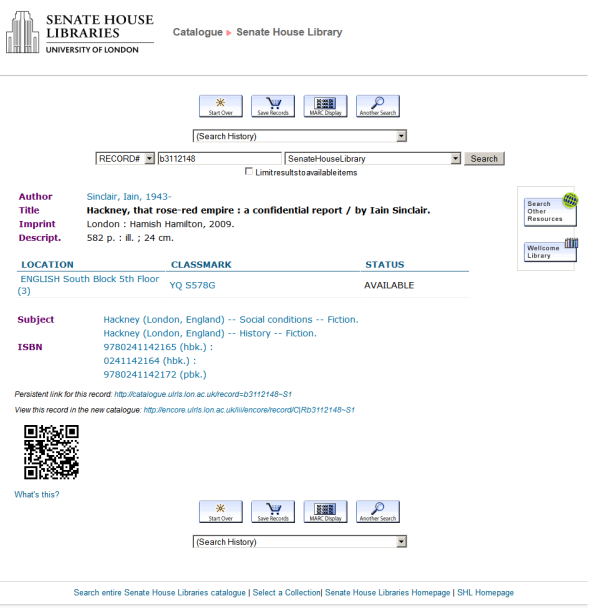
You will likely appreciate the explanation that the above is a link to Hackney, that rose-red empire : a confidential report / by Iain Sinclair in our mobile catalogue.

Why we wanted to do this

The reason is to embed some information about the item on the bibliographic record screen that is useful to a smartphone.

We’ve noted many readers making use of smartphones to record shelfmarks of items of interest versus pen and paper. It’s noticeable that more readers are coming to the enquiries desk to show us a record on a smartphone with a query about it. We’re not sure how readers are making the leap from the catalogue terminal to the smartphone though. Aaron Tay makes this observation:

These days, it’s very common for users to show me library catalogue records (call numbers, titles) on their hand phones when I’m at the desk. This seems to be quickly replacing scribbled notes on paper. I’m never worked out the courage to ask them though, how they got the information onto the handphones

Our assumption is a URL would be a useful thing to encode and as it’s for use on a smartphone, a link to our mobile catalogue might be the most appropriate thing. Have the right QR code app installed and you can snap away on the catalogue and end up with a list of items to go and find them (wayfinding in our building is another blog post).

I haven’t actually made this live yet: it will be live tomorrow!

How to do this in the Innovative ‘classic catalog’ / WebPAC

Here’s how. On your WebPAC server put this Javascript in /screens/qrcode.js:

function linkto_catalog_qr() {
        var qrairpacstub = "http://m.ulrls.lon.ac.uk/record=";
        var qrrecordlink = document.getElementById("recordnum").getAttribute("href");
        var str = qrrecordlink.indexOf("=");
        var qrrecordid = qrrecordlink.substr(str+1);
        document.write('<img src="http://chart.apis.google.com/chart?cht=qr&chs=120x120&chl='+qrairpacstub+qrrecordid+'" alt="QR code for this record" title="QR code for this record" />');
        document.write('<br/><a href="http://www.senatehouselibrary.ac.uk/library/helpandsupport/qrcodes.shtml">What's this?</a>');
}

Above, “recordnum” is the ID of a link inserted into the bib_display.html using the WebPAC <!–{recordlink}–> tag. This produces a link like this in the page markup:

<a id="recordnum" href="/record=b3112148~S1"></a>

In your INSERTTAG_INHEAD wwwoption, insert this:

INSERTTAG_INHEAD=<script language="JavaScript" type="text/javascript" src="/screens/qrcode.js"></script>

On your bib_display.html, put this JS where you want the QR code:

<script type="text/javascript">
<!--
linkto_catalog_qr();
-->
</script>

An alternative approach is to put the JavaScript to generate the markup into the WebBridge bib panel. Rather than using WebBridge to create a link, you embed the little chunk of JavaScript that generates the QR code for you. This idea is from Natalie Pollecutt at the Wellcome Library who posted about it on the IUG mailing list.

Wellcome Library haven’t made this live, but you can see it on their test / “staging” port, for example: From ‘cuckoos’ to ‘zombies’ : the changing portrayal of lobotomy in American popular fiction from 1960-2010 / by Amy Chandler.

Result

Hackney, that rose-red empire : a confidential report / by Iain Sinclair.